Safety and privacy
Approvals
Every move gets the same review, whoever asked for it.
Every move that takes money out of your wallet ends on one sheet: the review. It’s the same sheet whoever asked for the move. Nothing is signed until you tap Approve there and pass Face ID (Touch ID on a Mac) or your passcode.
Who can ask
Section titled “Who can ask”| Who asks | Where the review opens |
|---|---|
| You | Right there, from Send, Swap, Trade, Earn or Spot. |
| The assistant | Under its reply in chat, as a button like Review send or Review long ETH. A swap opens the Swap screen filled in, and you tap Review. |
| An automation | In that run’s own chat. The notification says “It prepared something that needs your approval. Nothing has moved.” |
| A web app | Over the page in Hermit’s browser, titled with the site, like “Transaction from app.uniswap.org”. |
The assistant and automations only ever prepare. They hold no key and can’t tap Approve for you.
Send 10 USDC on Base to 0x8c3F2b9A41D0e7C5a96B1f2E4d3C0a9B8e7D6c51
- Preparing the transfer for your review
A Review send button. Nothing has moved. Tap it and the review opens.
What the review shows
Section titled “What the review shows”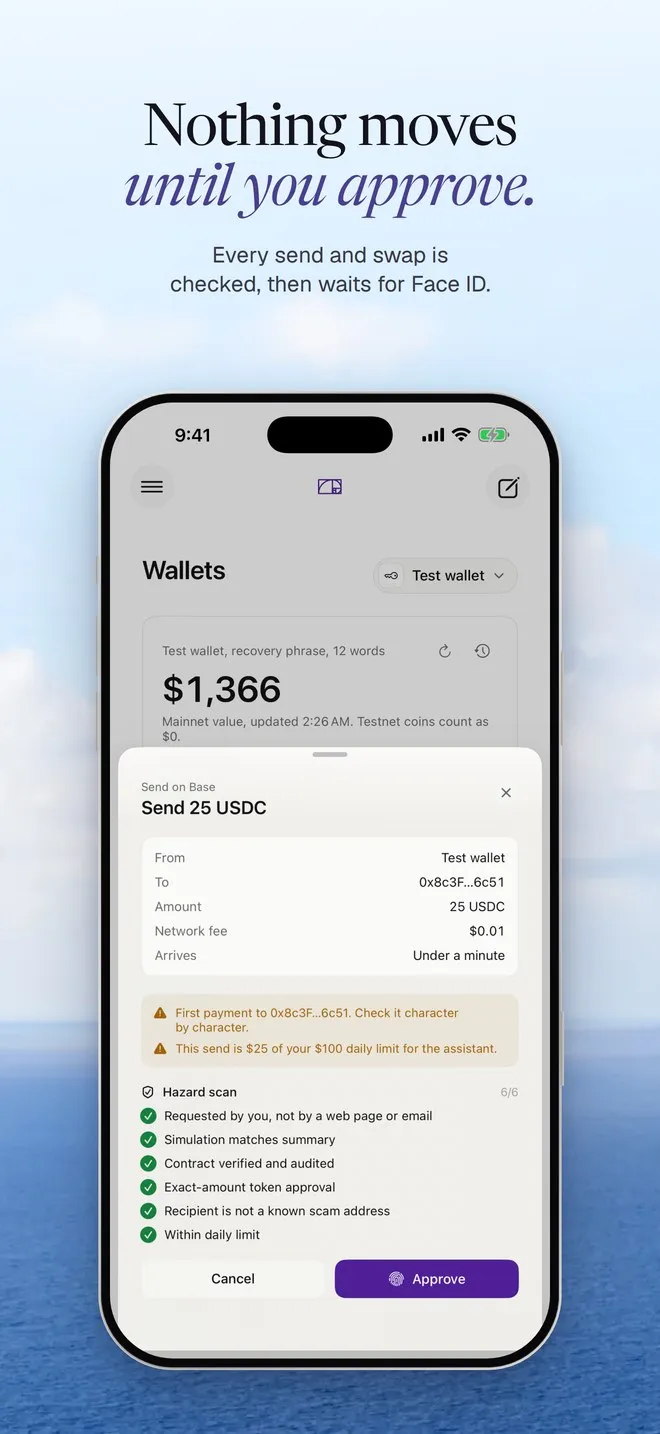
From top to bottom:
- What kind of move it is and a title, like “Send on Base” and “Send 25 USDC”.
- A summary box with the details: from, to, amount and network fee for a send; margin, leverage and the liquidation estimate for a trade; the site, wallet and network for a web app.
- Warnings in amber, right above Approve. The one you’ll see most is “First payment to 0x8c3F…6c51. Check it character by character.”
- Hazard scan: the checks Hermit actually ran for this move, each with a tick. Only checks that passed get a tick. A warning is never shown as a pass.
- Cancel and Approve.
Approving a move
Section titled “Approving a move”-
Read the summary. For a send, compare the To line with the address you meant, start and end.
-
Read every amber line. If one surprises you, tap Cancel. Nothing is signed.
-
Tap Approve. Face ID, Touch ID or your passcode unlocks the key for this one signature, and the key is wiped from memory right after.
-
The button reads Signing while it goes out. You can’t close the sheet now, so the same move can’t be approved twice. When it’s done you see a green line like “Sent 25 USDC” and the transaction hash.
If something fails after you approve, the reason shows in red on the sheet and you can try again or cancel.
Blocked moves never reach a review
Section titled “Blocked moves never reach a review”Hermit runs its checks before the review opens. If one says no, there’s nothing to approve, and you see why instead. Some real examples:
- “Over your daily limit: $120 of $500 left today.”
- “The assistant can prepare up to $100 per move. Open Swap yourself for more.”
- “Price impact is 18.2%, so Hermit won’t send it. Try a smaller amount.”
The rules behind these are on the spending policy and scam tokens pages.
Old review buttons
Section titled “Old review buttons”A Review button in a chat you reopen later has nothing behind it. Tapping Approve on it shows “This review expired. Ask again and I’ll prepare a new one.” Ask again and you get a fresh review with live numbers.