Use Hermit
Calendar
Your device calendar, your tasks and your scheduled payments on one grid, read on the device.
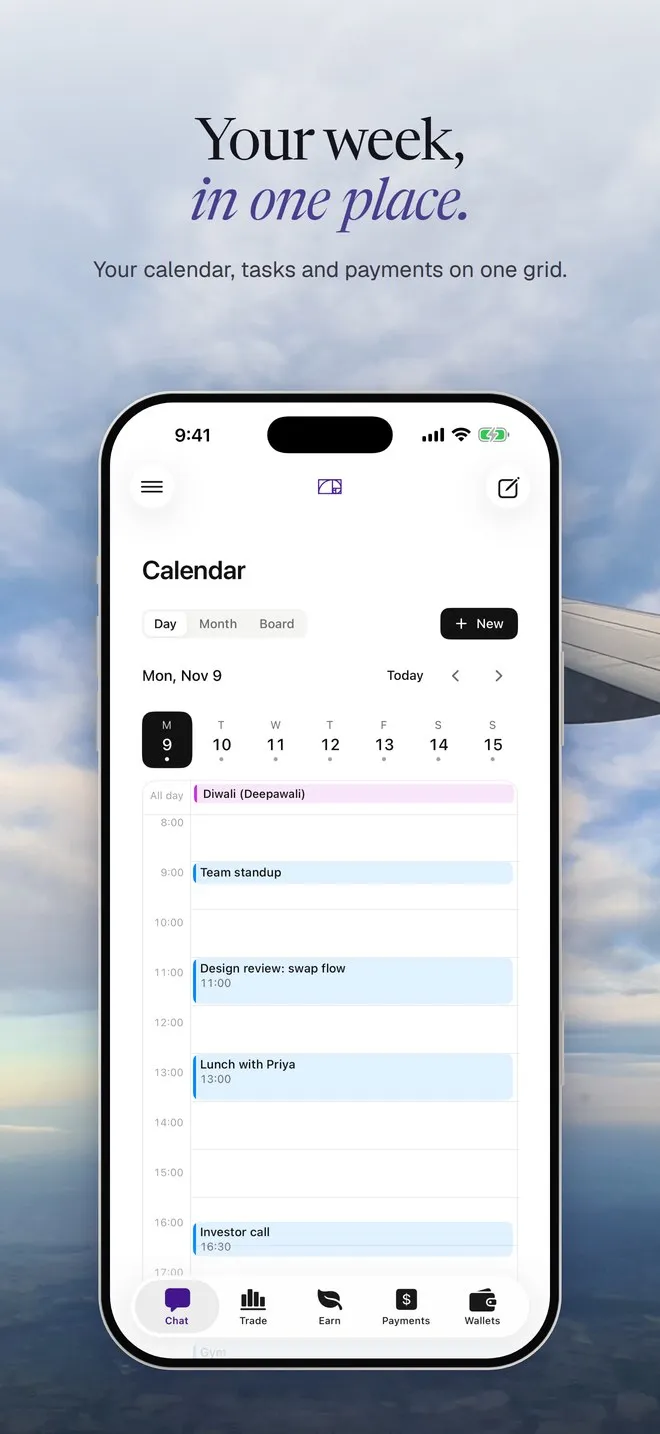
Calendar shows three things together: events from your phone’s or Mac’s own calendar, tasks and events you add in Hermit, and your scheduled payments. It’s in the sidebar on a Mac and in the menu on iPhone.
Allow access
Section titled “Allow access”- Open Calendar. The banner says “Show your calendar here: Hermit reads your events on this device. Nothing leaves it.”
- Tap Allow access and allow full access in the system prompt.
- Your events appear on the grid.
Hermit reads your calendar through Apple’s calendar framework, on the device. It isn’t sent anywhere, and the assistant in chat doesn’t read it yet.
If you said no, the banner says “Calendar access is off”. If you gave Hermit only the right to add events, it says “Hermit can add events but not read them”. Either way, tap Open Settings and turn on full access to Calendars for Hermit.
Find your way around
Section titled “Find your way around”Pick Week, Month or Board at the top. On iPhone, Week is Day, with a strip of the week above it. Today and the arrows move through time. If your tasks belong to projects, chips filter by project.
Board sorts your Hermit tasks by status: To do, In progress, Done.
Add a task or event
Section titled “Add a task or event”- Tap New, or tap an empty slot on the grid.
- Type a title and choose Task or Event.
- Set the date, the time (or All day), the length, and a project if you want one.
- Tap Add.
With calendar access, a new event goes into your device calendar (“Adds it to your calendar.”). Without it, Hermit keeps it on its own grid (“Saved in Hermit. Allow calendar access to add events to your calendar.”). Tasks always stay in Hermit.
Tap any item to open it. Your Hermit items can be edited, marked done or deleted. Events from your device calendar and scheduled payments open read-only. Edit those in the Calendar app or in Payments. Every item has Ask Hermit, which starts a chat about it.